Posts

Showing posts from 2010

Forwarding apache requests to Tomcat servlet container

Image
Most web applications todays are using favorite Apache web server for its proven architecture and free apache license. Tomcat is same as a very famous servlet container or java application server.  Although tomcat itself can be access as a simple web server, for production environments it may lack some features like load-balancing, redundancy, etc. So the best way to use is to integrate those two application, and finally its a great combination for enterprise applications for excess performance and ease of maintenance. The theory behind is to use a middle tier connector called mod_jk.so module which communicate using AJP(Apache JSer Protocol ) version 1.3, best of currently available stable version.See the following figure for graphical view. Here in this small steps guide i configure an Apache2 to a single instance of Tomcat6.Any comments and improvements are welcome at the end. installations: install apache2;Web server who list...

Enable Packet forwarding on for Internet Connection Sharing on Linux

Enable NATting for internet connection: ppp0-internet connected port add on startup or to /etc/init.d/rc.local sudo iptables -t nat -A POSTROUTING -o ppp0 -j MASQUERADE Enable Packet accep for incoming requests: Edit following file and change/uncomment following line to enable packet forwarding for incoming request packets. /etc/sysctl.conf: net.ipv4.ip_forward = 1 to get control over the packet forwarding, we can forward all NATed packets to a local proxy server to disable direct packet forwarding, change /etc/sysctl.conf: net.ipv4.ip_forward = 0 then add an additional route; i don't know whether the sequence of following will affect, just check you guys ans let me know.... :-) iptables -t nat -A PREROUTING -i eth1 -p tcp --dport 80 -j REDIRECT --to-port 3128 iptables -t nat -A POSTROUTING -o ppp0 -j MASQUERADE

Approach to Multi Threaded Socket Communication

On this article i will introduce with socket connection on single server multiple clients,Single client multiple messages(transaction based continuous connection),Multiple client multiple transaction (per connection). I will proceed with two methods of threading (extend Thread and implement Runnable). Also at the requirement, i'll explain the use of synchronized shared objects and serialized data objects. This article is the extend of  basic-socket-programming   article on  www.chandpriyankara.tk / www.estudents.lk single server multiple clients This scenario is the most widely used socket communication in general.For example web servers.Many clients connects to the server requesting some data.The 3way TCP/IP handshake will initiate and identifies the two parties.Here, as regular, client who needs data wants to start the connection.Server or the data source must be up and running, waiting for a connection request form a client for a particular local ...

Basic Socket Programming

Image
Socket programming a is data exchange method used in electrical systems, specially within two or more(even itself) systems within a network reachability. Inter networked computers are widely using this method to transfer various data and information with remote systems.Socket programming, just up on the TCP layer, provides a mean of interprocess communication. In order to successful completion of the socket communication, all TCP/IP and lower layers need to be fully and correctly in functional. As this articel involved in explaining simple simple data transfer implementation we will limit the limit our scope into computer application programming with its simplest form. In order to exchange data within systems, there need to be at least two parties, who  Requires  some data to transfer to a  Listener  party. Who request to send data, or the one who initiate to connect is called the client. Who is ready to listen, and waiting for some one else to initiate a request...

Steps for creating blazds communication

Steps for creating blazds communication 1.web.xml need to hava servlet mapping for servlet engine   [            flex.messaging.HttpFlexSession                       MessageBrokerServlet          MessageBrokerServlet          flex.messaging.MessageBrokerServlet                       services.configuration.file              /WEB-INF/flex/services-config.xml                 1    RDSDispatchServlet RDSDispatchServlet flex.rds.server.servlet.FrontEndServlet useAppserverSecurity false 10 RDSDispatchServlet /CFIDE/main/ide.cfm               MessageBrokerServlet        ...

RIA With Flex & Java Using BlazeDS

Check out this SlideShare Presentation: RIA With Flex & Java Using BlazeDS View more presentations from hluu .

S-T-D

What STD is a Linux-based Security Tool. Actually, it is a collection of hundreds if not thousands of open source security tools. It's a Live Linux Distro, which means it runs from a bootable CD in memory without changing the native operating system of the host computer. Its sole purpose in life is to put as many security tools at your disposal with as slick an interface as it can. Who STD is meant to be used by both novice and professional security personnel but is not ideal for the Linux uninitiated. STD assumes you know the basics of Linux as most of your work will be done from the command line. If you are completely new to Linux, it's best you start with another live Distro like Knoppix to practice the basics (see faq ). STD is designed to assist network administrators and professionals alike secure their networks. The STD community is extremely active. Come and join us on the forum here The STD community is without exception White Hat. This means we will not entertain disc...

Configuring HTTPS for standalone tomcat

its really simple. 1> make a security key. from command line go to java bin and type : use the same password for both acquires occations keytool -genkey -alias tomcat -keyalg RSA 2> change the server.xml at tomcat conf folder and change like follows uncomment the SSL configurations and add few other options to  the Connector section:                                maxThreads="150" minSpareThreads="25" maxSpareThreads="75"                enableLookups="false" disableUploadTimeout="true"                acceptCount="100" scheme="https" secure="true"                clientAuth="false" sslProtocol="TLS"    keystoreFile="${user.home}/.keystore"    keystorePass="adminabc123"/> keystorePass="adminabc123" is the password yo...

Password recover process for Unix like systems

Image
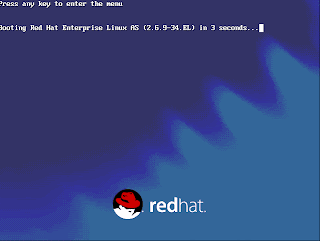
This post will help you to change the root password of Unix flavors on RedHat, Fedora, etc... 1.Let the system to boot.When the Boot Loader is starting....... press ' e ' to enter the menu edition dialog box. Then you will come to the following screen. 2.Confirm by pressing 'Enter key' to edit the boot configurations. You will see the advanced boot configuration menu with all available boot images. 3.Again press ' e' , where you will end-up with following screen. 4. Here you can to set the Kernel Run Level: simply add :' 1' as done on the above figure. Then you Enter and you will come back to the Advanced boot menu. There you just press letter ' b ' to start booting the system. 5.What we have done above is to change the boot-loader settings to change the boot configurations to make a minimum boot with single user mode run level. So as expected you will end-up with LOVING #: root level access, and further its infinite access to the syste...

Tomcat and Apache Setup

Image
Tomcat and Apache Setup Most Tomcat configurations are a Apache/Tomcat setup, Apache serving up the static content and then passing any JSP to Tomcat to process. Tomcat can be integrated with Apache by using the JK Connector. The JK Connector uses the Apache JSserv Protocol (AJP) for communications between Tomcat and Apache. The AJP Connector The AJP protocol is used for communication between Tomcat and Apache, the software modules used on Apache are mod_jk or mod_proxy . Both are native code extension modules written in C/C++, on the Tomcat side the software module is the AJP Connector written in Java. The below diagram shows how the native code Apache module ( mod_jk or mod_proxy) works with Tomcat. Apache will receive the incoming JSP or servlet request and using the Apache module will pass this request via the AJP protocol to Tomcat, the response will also be sent back to the Apache server via the AJP protocol. The Apache JServ Protocol (AJP) uses a binary format for transm...