Posts

Showing posts from September, 2010

S-T-D

What STD is a Linux-based Security Tool. Actually, it is a collection of hundreds if not thousands of open source security tools. It's a Live Linux Distro, which means it runs from a bootable CD in memory without changing the native operating system of the host computer. Its sole purpose in life is to put as many security tools at your disposal with as slick an interface as it can. Who STD is meant to be used by both novice and professional security personnel but is not ideal for the Linux uninitiated. STD assumes you know the basics of Linux as most of your work will be done from the command line. If you are completely new to Linux, it's best you start with another live Distro like Knoppix to practice the basics (see faq ). STD is designed to assist network administrators and professionals alike secure their networks. The STD community is extremely active. Come and join us on the forum here The STD community is without exception White Hat. This means we will not entertain disc...
Configuring HTTPS for standalone tomcat

its really simple. 1> make a security key. from command line go to java bin and type : use the same password for both acquires occations keytool -genkey -alias tomcat -keyalg RSA 2> change the server.xml at tomcat conf folder and change like follows uncomment the SSL configurations and add few other options to  the Connector section:                                maxThreads="150" minSpareThreads="25" maxSpareThreads="75"                enableLookups="false" disableUploadTimeout="true"                acceptCount="100" scheme="https" secure="true"                clientAuth="false" sslProtocol="TLS"    keystoreFile="${user.home}/.keystore"    keystorePass="adminabc123"/> keystorePass="adminabc123" is the password yo...

Password recover process for Unix like systems

Image
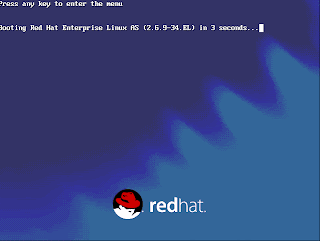
This post will help you to change the root password of Unix flavors on RedHat, Fedora, etc... 1.Let the system to boot.When the Boot Loader is starting....... press ' e ' to enter the menu edition dialog box. Then you will come to the following screen. 2.Confirm by pressing 'Enter key' to edit the boot configurations. You will see the advanced boot configuration menu with all available boot images. 3.Again press ' e' , where you will end-up with following screen. 4. Here you can to set the Kernel Run Level: simply add :' 1' as done on the above figure. Then you Enter and you will come back to the Advanced boot menu. There you just press letter ' b ' to start booting the system. 5.What we have done above is to change the boot-loader settings to change the boot configurations to make a minimum boot with single user mode run level. So as expected you will end-up with LOVING #: root level access, and further its infinite access to the syste...

Tomcat and Apache Setup

Image
Tomcat and Apache Setup Most Tomcat configurations are a Apache/Tomcat setup, Apache serving up the static content and then passing any JSP to Tomcat to process. Tomcat can be integrated with Apache by using the JK Connector. The JK Connector uses the Apache JSserv Protocol (AJP) for communications between Tomcat and Apache. The AJP Connector The AJP protocol is used for communication between Tomcat and Apache, the software modules used on Apache are mod_jk or mod_proxy . Both are native code extension modules written in C/C++, on the Tomcat side the software module is the AJP Connector written in Java. The below diagram shows how the native code Apache module ( mod_jk or mod_proxy) works with Tomcat. Apache will receive the incoming JSP or servlet request and using the Apache module will pass this request via the AJP protocol to Tomcat, the response will also be sent back to the Apache server via the AJP protocol. The Apache JServ Protocol (AJP) uses a binary format for transm...

Tomcat 6 - Clustering

Image
Tomcat Clustering Clustering refers to running multiple instances of Tomcat that appear as one Tomcat instance. If one instance was to fail the other instances would take over thus the end user would not notice any failures. Clustering in Tomcat enables a set of Tomcat instances on a LAN to appear to the users a single server, as detailed in the below picture. This architecture allows more requests to handled and can handle if one server were to crash ( High Availability) . Incoming requests are distributed across all servers, thus the service can handle more users. This approach is known as horizontal scaling thus you can buy cheaper hardware and still use existing hardware without having to upgrade your existing hardware. There are a number of different clustering models that are used Master-Backup, Fail-Over, Tomcat uses both of these and incorporates load balancing as well. Tomcat Clustering Model The Tomcat clustering model can be divided into two layers and various compon...