Posts

Showing posts from 2013

Killing a file handled process

You may have faced the problem which a dead/unreferenced process is holding a file descriptor to a file, so that you cant delete it using rm command, and giving an error message like below: Cannot delete folder with rm -rf. Error: device or resource busy Here what you have to do is to identify the process been hanged and kill it. lsof +D this will give you a list of process which are accessing files in the given folder. kill that session using: kill if you still couldn't kill it use below. kill -s SEGV 'via Blog this'

Upgrade SVN client in older ubuntu versions

Ubuntu LTS version[12.04] doesn't have svn client 1.7 installed. If you tried to use a newer svn local repository with default version, you get an error: This is the fix: sudo apt-add-repository ppa:dominik-stadler/subversion-1.7 If you already have subversion previous intalled, remove it sudo apt-get remove subversion sudo apt-get update Now, reinstalling subversion will fix your issue. But it may required to download some files [about 4 MB] from subversion site. sudo apt-get install subversion

Make your Ubuntu Terminal - Case-Insensitive.

Sometimes its annoyed when you type a command on the terminal. Because it doesn't find a directory or an application, just because you miss capital/simple letters. Using below command you can avoid such issues if [ ! -a ~/.inputrc ]; then echo "\$include /etc/inputrc" > ~/.inputrc; fi echo "set completion-ignore-case On" >> ~/.inputrc

Oracle pagination query example

    select         *      from         ( select             row_.*,             rownum rownum_          from             (  YOUR SELECT STATEMENT WITH WHERE,GROUP,ORDER,AGGREGATES,ETC  ) row_ )          where             rownum_ <= ?              and rownum_ > ?

Important Oracle queries

SELECT s.inst_id,        s.sid,        s.serial#,        p.spid,        s.username,        s.program FROM   gv$session s        JOIN gv$process p ON p.addr = s.paddr AND p.inst_id = s.inst_id WHERE  s.type != 'BACKGROUND'; ALTER SYSTEM KILL SESSION '8,11'; SELECT O.OBJECT_NAME, S.SID, S.SERIAL#, P.SPID, S.PROGRAM,S.USERNAME, S.MACHINE,S.PORT , S.LOGON_TIME,SQ.SQL_FULLTEXT FROM V$LOCKED_OBJECT L, DBA_OBJECTS O, V$SESSION S, V$PROCESS P, V$SQL SQ WHERE L.OBJECT_ID = O.OBJECT_ID AND L.SESSION_ID = S.SID AND S.PADDR = P.ADDR AND S.SQL_ADDRESS = SQ.ADDRESS;   SET AUTOTRACE ON;   SET TIMING ON;   SELECT PLAN_TABLE_OUTPUT FROM TABLE(DBMS_XPLAN.DISPLAY());     explain plan FOR ...          alter user e2etracking identified by e2etracking account unlock;

Using ComboPooledDataSource in Spring context

destroy-method="close"> jdbc.Driver=oracle.jdbc.OracleDriver jdbc.url=jdbc:oracle:thin:@serverhost:1521:XE jdbc.username=xxxxx jdbc.password=xxxxxx #jdbc.url=jdbc:oracle:thin:@serverhost:1521/SERVICE_NAME jdbc.initialSize=2 jdbc.maxActive=5 jdbc.maxIdle=2 jdbc.minIdle=1 jdbc.validationQuery=select 1 from dual jdbc.removeAbandoned=true

Oracle Group by a String column by string concatenation of its values

CREATE OR REPLACE VIEW SOWCUSTOMERPROJECTVIEW AS   SELECT OPPRTNTY.CUST_ACNT_NBR,     OPPRTNTY.OPPRTNTY_ID,     OPPRTNTY.EXT_OPPRTNTY_ID,     OPPRTNTY.OPPRTNTY_NM,     OPPRTNTY.OPPRTNTY_DSC,     LISTAGG(PROJECT.PROJECT_NM, ', ') WITHIN GROUP (   ORDER BY PROJECT.PROJECT_NM) AS SUB_PRODUCT,     LISTAGG(BATCH_CLASS.BATCH_CLASS_NM, ', ') WITHIN GROUP (   ORDER BY BATCH_CLASS.BATCH_CLASS_NM) AS SUB_PRODUCT2,     --PROJECT.PROJECT_NM,     --BATCH_CLASS.BATCH_CLASS_NM,     COUNT(PROJECT.PROJECT_ID) AS cnt   FROM OPPRTNTY   INNER JOIN PROJECT   ON OPPRTNTY.OPPRTNTY_ID = PROJECT.OPPRTNTY_ID   INNER JOIN BATCH_CLASS   ON BATCH_CLASS.BATCH_CLASS_ID = PROJECT.BATCH_CLASS_ID   GROUP BY OPPRTNTY.CUST_ACNT_NBR,     OPPRTNTY.OPPRTNTY_ID,     OPPRTNTY.EX...

Casting JComboBox to JTextComponent to get Key Release event

JFrame frame = new JFrame ( "Welcome!!" ); frame . setDefaultCloseOperation ( JFrame . EXIT_ON_CLOSE ); JComboBox cmb = new JComboBox (); cmb . setEditable ( true ); cmb . getEditor (). getEditorComponent (). addKeyListener ( new KeyAdapter () { @Override public void keyReleased ( KeyEvent event ) { if ( event . getKeyChar () == KeyEvent . VK_ENTER ) { if ((( JTextComponent ) (( JComboBox ) (( Component ) event . getSource ()). getParent ()). getEditor () . getEditorComponent ()). getText (). isEmpty ()) System . out . println ( "please dont make me blank" ); } } }); frame . add ( cmb ); frame . setLocationRelativeTo ( null ); frame . setSize ( 300 , 50 ); frame . setVisible ( true );

Best time for coding...

Image
No words can explain that this image

Best time for coding...

Image
No words can explain that this image

How to forcefully disconnect a connected user from an Oracle Databases

Image
Find existing sessions to DB using this query: SELECT s . inst_id , s . sid , s . serial #, p . spid , s . username , s . program FROM gv $ session s JOIN gv $ process p ON p . addr = s . paddr AND p . inst_id = s . inst_id WHERE s . type != 'BACKGROUND' ; you'll see something like below.  Then, run below query with values extracted from above results. ALTER SYSTEM KILL SESSION ' , ' ; Ex:  ALTER SYSTEM KILL SESSION '93,943';

How to enable/disable SynapticsTouchpad on Linux Xorg systems

Image
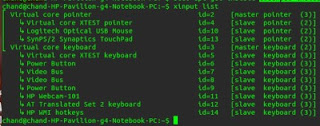
Once in linux, you may required to disable touch pad for a while when you are using keyboard. Unlike in Windows, you may not have specific propitiatory drivers installed to enable or disable it. Below are two options. First see the list of all Xorg input devices configured and make sure your touch pad is properly working. First Method: xinput list Identify your id from above list. For example my touch pad's id is 13. So now I can enable or disable it. To enable: xinput set-prop 13 'Device Enabled' 1 To disable: xinput set-prop 13 'Device Enabled' 0 Second method: By using simple UI applet program. If your compatible package manager is apt[eg default on Ubuntu and other Debian systems] sudo add-apt-repository ppa:atareao/atareao sudo apt-get update sudo apt-get install touchpad-indicator You can open newly installed app from Applications->Accessories->Touchpad-indicator You'll see below icon : Enjoy!

Re-Mounting an existing SVN repository to a newly installed svnserve instance

svnserve --root /media/HpData/svn/devrepo/ -d

Installing AMD ATI Display driver on Linux based systems

To get most features from  AMD ATI recent graphic hardware on Linux environments, you have to rely on its vendor specific propitiatory device drivers. There are few versions of device drivers available for Linux environments. But many users are still unable to get it installed correctly. One of the main reason is FLGRX driver installation doesn't make its driver enabled once after installed. On Driver installation window you see something like, 'installed but not using' . Here are the command lines to install those correctly. Right click on the desktop and open a terminal Make sure you're connected to the Internet Type the following commands and reboot the computer: apt clean apt update apt reinstall build-essential module-assistant fglrx-driver fglrx-modules-dkms libgl1-fglrx-glx glx-alternative-fglrx fglrx-control fglrx-glx sudo aticonfig --initial -f Here, following code is the one exactly enable and ...

Move Window Buttons Back to the Right in Ubuntu 12.04 / 12.10

gsettings set org.gnome.desktop.wm.preferences button-layout ':minimize,maximize,close'

Install LogMeIn Hamachi with GUI On Ubuntu

LogMeIn Hamachi is a free VPN creator. Hamachi is normally used for playing (multiplayer) games like minecraft. You can install Hamachi on Ubuntu normally but the problem is that you have to use the terminal to work with Hamachi  (i.e there is no GUI). This problem can be tackled with the help of Haguichi. Haguichi gives Hamachi a user interface on Ubuntu. So here is how you install Hamachi with GUI on Ubuntu. Installing Hamachi: First we shall install Hamachi the normal way and then add a GUI to it. To install, download .deb install file for Hamachi: Hamachi For x86 (32-bit) Hamachi For x64 (64-bit) Open .deb after you download it. When you open the file you downloaded, the Ubuntu software center will open with the Hamachi page. Just click on install and Hamachi installation will start. After that is done, we need to install Haguichi. continue to the next step to install Haguichi. Insta...

Passing a string from c++ to Python function

Passing a string from c++ to Python function and vice-versa: Initialize all required variables first. Py_Initialize (); object main_module = import ( "__main__" ); //boost::python objects object dictionary = main_module . attr ( "__dict__" ); Run a code to create a variable and set an initial value and print it inside python. boost :: python :: exec ( "resultStr = 'oldvalue'" , dictionary ); PyRun_SimpleString ( "print resultStr" ); //new value will reflect in python read the same variable from c++. boost :: python :: object resultStr = dictionary [ "resultStr" ]; //read value from python to c++ std :: string & processedScript = extract < std :: string >( resultStr ); Above dictionary object is like a shared map. you can set a variable from c++. Then check the new value from python. dictionary [ "resultStr" ] = "new value" ; //set the variable value PyRun_SimpleString ( "print re...

Three Optimization Tips for C++ - by Andrei Alexandrescu

Image
This is an approximate transcript of my talk at Facebook NYC on December 4, 2012, which discusses optimization tips for C++ programs. The video of the talk is  here  and the accompanying slides are  here . Scope Commonly given advice about approaching optimization in general, and optimization of C++ code in particular, includes: Quoting Knuth more or less out of context The classic one-two punch: (a) Don't do it; (b) Don't do it yet Focus on algorithms, not on micro-optimization Most programs are I/O bound Avoid constructing objects unnecessarily Use C++11's rvalue references to implement move constructors That's great advice, save for two issues. First, it has becomed hackneyed by overuse and is often wielded to dogmatically smother new discussions before they even happen. Second, some of it is vague. For example, "choose the right algorithm" is vacuous without a good understanding of what algorithms are best supported by the computing fabri...