Posts

Showing posts from May, 2013

Best time for coding...

Image
No words can explain that this image

Best time for coding...

Image
No words can explain that this image

How to forcefully disconnect a connected user from an Oracle Databases

Image
Find existing sessions to DB using this query: SELECT s . inst_id , s . sid , s . serial #, p . spid , s . username , s . program FROM gv $ session s JOIN gv $ process p ON p . addr = s . paddr AND p . inst_id = s . inst_id WHERE s . type != 'BACKGROUND' ; you'll see something like below.  Then, run below query with values extracted from above results. ALTER SYSTEM KILL SESSION ' , ' ; Ex:  ALTER SYSTEM KILL SESSION '93,943';

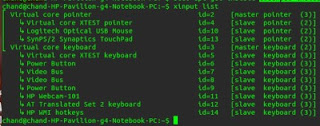
How to enable/disable SynapticsTouchpad on Linux Xorg systems

Image
Once in linux, you may required to disable touch pad for a while when you are using keyboard. Unlike in Windows, you may not have specific propitiatory drivers installed to enable or disable it. Below are two options. First see the list of all Xorg input devices configured and make sure your touch pad is properly working. First Method: xinput list Identify your id from above list. For example my touch pad's id is 13. So now I can enable or disable it. To enable: xinput set-prop 13 'Device Enabled' 1 To disable: xinput set-prop 13 'Device Enabled' 0 Second method: By using simple UI applet program. If your compatible package manager is apt[eg default on Ubuntu and other Debian systems] sudo add-apt-repository ppa:atareao/atareao sudo apt-get update sudo apt-get install touchpad-indicator You can open newly installed app from Applications->Accessories->Touchpad-indicator You'll see below icon : Enjoy!

Re-Mounting an existing SVN repository to a newly installed svnserve instance

svnserve --root /media/HpData/svn/devrepo/ -d

Installing AMD ATI Display driver on Linux based systems

To get most features from  AMD ATI recent graphic hardware on Linux environments, you have to rely on its vendor specific propitiatory device drivers. There are few versions of device drivers available for Linux environments. But many users are still unable to get it installed correctly. One of the main reason is FLGRX driver installation doesn't make its driver enabled once after installed. On Driver installation window you see something like, 'installed but not using' . Here are the command lines to install those correctly. Right click on the desktop and open a terminal Make sure you're connected to the Internet Type the following commands and reboot the computer: apt clean apt update apt reinstall build-essential module-assistant fglrx-driver fglrx-modules-dkms libgl1-fglrx-glx glx-alternative-fglrx fglrx-control fglrx-glx sudo aticonfig --initial -f Here, following code is the one exactly enable and ...

Move Window Buttons Back to the Right in Ubuntu 12.04 / 12.10

gsettings set org.gnome.desktop.wm.preferences button-layout ':minimize,maximize,close'